Reviving a Weather Underground Station with Home Assistant and ESPHome
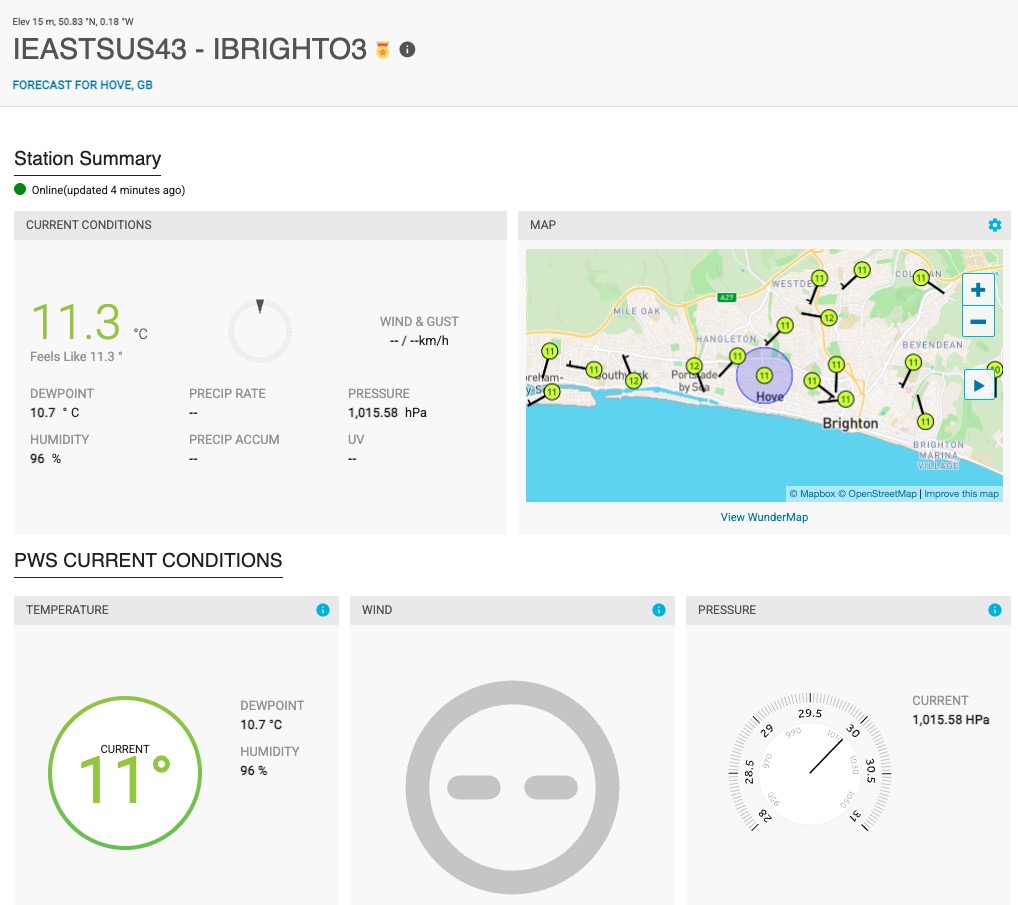
Station IBRIGHTO3 had been dormant for years. Reviving it required no dedicated weather station hardware — just sensors already deployed around the house, a few template conversions in Home Assistant, and a REST command firing every five minutes.
Hardware
The station currently reports three parameters:
- Temperature and humidity — AirGradient O-1PS outdoor sensor (SHT40), reporting via MQTT to HA
- Barometric pressure — DPS310 sensor on an ESP32-C6, integrated via ESPHome native API
The DPS310 is a good choice for pressure — it is a high-resolution MEMS barometer with better temperature compensation than the commonly used BME280, and ESPHome has native support for it.
How Weather Underground PWS Upload Works
WU accepts data from personal weather stations via a simple HTTP GET request to their legacy upload endpoint. No library required — just a correctly formatted URL with your station credentials and sensor values appended as query parameters.
WU expects all values in imperial units:
- Temperature in °F
- Pressure in inHg (not hPa)
- Dewpoint in °F
- Humidity in %
All conversions are handled in HA Jinja2 templates at upload time, so the sensors themselves can report in metric as normal.
Setting Up Your Weather Underground Station
If you do not already have a WU account and station registered:
- Create an account at wunderground.com
- Go to My Profile → My Devices → Add New Device
- Register your station — you will need an approximate location and elevation
- Note your Station ID (e.g.
IBRIGHTO3) and Station Key — the key acts as a password for uploads
Keep the station key out of your git repository and out of published yaml. Store it in secrets.yaml — see the foundations page if you have not set that up.
HA Configuration
rest_command
Add this to configuration.yaml, substituting your own station ID and key:
rest_command:
  weather_underground:
    url: "https://weatherstation.wunderground.com/weatherstation/updateweatherstation.php?ID=YOUR_STATION_ID&PASSWORD=YOUR_STATION_KEY&dateutc=now&tempf={{ tempf }}&humidity={{ humidity }}&baromin={{ baromin }}&dewptf={{ dewptf }}&action=updateraw"
    method: GET
Automation
This fires every five minutes and assembles all the converted values before calling the REST command. The dewpoint uses the Magnus-Alduchov formula — more accurate than the simplified approximation commonly found online:
alias: Weather Underground Update
triggers:
  - minutes: /5
    trigger: time_pattern
actions:
  - data:
      tempf: >-
        {{ ((states('sensor.o_1ps_outdoors_air_temperature') | float * 9/5) +
        32) | round(1) }}
      humidity: "{{ states('sensor.o_1ps_outdoors_air_humidity') | float | round(1) }}"
      baromin: >-
        {{ (states('sensor.esp32_c6_zero_2_dps310_pressure_dps310') | float *
        0.02953) | round(2) }}
      dewptf: >-
        {{ ((243.04 * ((states('sensor.o_1ps_outdoors_air_humidity') | float /
        100) | log + (17.625 * (states('sensor.o_1ps_outdoors_air_temperature')
        | float)) / (243.04 + (states('sensor.o_1ps_outdoors_air_temperature') |
        float))) / (17.625 - ((states('sensor.o_1ps_outdoors_air_humidity') |
        float / 100) | log + (17.625 *
        (states('sensor.o_1ps_outdoors_air_temperature') | float)) / (243.04 +
        (states('sensor.o_1ps_outdoors_air_temperature') | float)))) * 9/5) +
        32) | round(1) }}
    action: rest_command.weather_underground
Adjust the entity IDs to match your own sensors.
Unit Conversions
| Parameter | Sensor unit | WU unit | Conversion |
|---|---|---|---|
| Temperature | °C | °F | (C × 9/5) + 32 |
| Pressure | hPa | inHg | hPa × 0.02953 |
| Humidity | % | % | none |
| Dewpoint | calculated | °F | Magnus-Alduchov → °F |
The Magnus-Alduchov formula for dewpoint in °C before the imperial conversion:
Td = 243.04 × (ln(RH/100) + 17.625T/(243.04+T)) / (17.625 − (ln(RH/100) + 17.625T/(243.04+T)))
Where T is temperature in °C and RH is relative humidity in %. The Jinja2 log filter computes the natural logarithm, which is what the formula requires.
Verifying Uploads
Once the automation is running, check the WU dashboard for your station — it should show “Online (updated X minutes ago)” within the first update cycle. The WunderMap will show your station alongside neighbouring stations with current conditions.
If uploads are not appearing, check the HA logbook for the automation and look for errors on the rest_command.weather_underground call. A 400 response usually means a malformed URL or incorrect station credentials. A blank response with no error typically means the station key is correct but the station ID was not found.
Planned Upgrades
The current sensor complement covers the basics well. Two upgrades are planned:
SHT45 in a proper outdoor enclosure — the AirGradient O-1PS will be replaced with a calibrated SHT45 in a Stevenson screen-style enclosure. The SHT45 is Sensirion’s highest-accuracy humidity sensor and has been calibrated against a saturated NaCl reference standard (ASTM E104 method) — see the SHT45 calibration post for that process. This will improve humidity and temperature accuracy meaningfully.
Hydreon RG-15 optical rain gauge — the RG-15 reports rainfall accumulation in mm and intensity in mm/hr via UART, which is exactly what WU expects. Unlike tipping bucket gauges it has no moving parts and is self-cleaning. ESPHome has community support for the Hydreon series. Rain is currently the only gap in the station’s sensor set — wind and UV are not practical at this location.