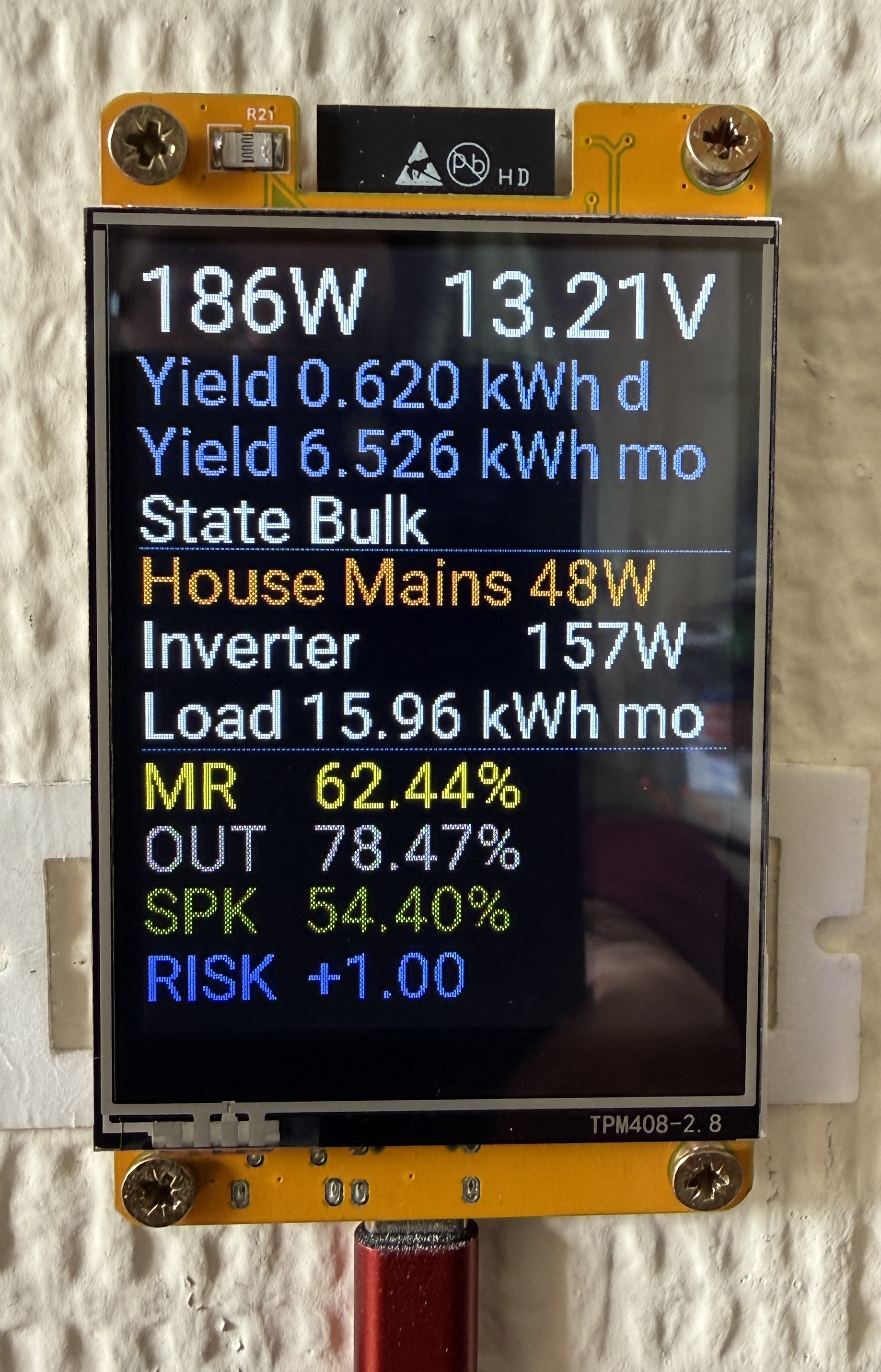
What Is It?
The board sold on AliExpress as “ESP32 Arduino LVGL WIFI&Bluetooth Development Board 2.8" 240×320 Smart Display Screen with Touch WROOM” has become something of a community favourite. It is widely known as the CYD — Cheap Yellow Display — named for its yellow PCB. For under £10 delivered it gives you:
- ESP32-WROOM-32 (dual core, 240MHz, 4MB flash)
- ILI9341 2.8" TFT LCD, 240×320 pixels, 16-bit colour
- XPT2046 resistive touchscreen
- RGB LED
- LDR light sensor
- SD card slot
- USB-C programming and power
The display quality is genuinely impressive for the price. It ships running an LVGL demo that shows what the hardware is capable of. ESPHome support is solid and well documented.
If you have not set up secrets.yaml, the ESPHome addon, or MQTT yet, read the foundations page first — this post assumes that groundwork is in place.
Flashing with ESPHome
No soldering required. The board programs directly over USB-C.
- Plug the board into your Mac via USB-C
- Open Chrome and go to web.esphome.io
- Click Connect, select the serial port (appears as a CP210x or CH340 device)
- Click Prepare for first use — this installs a minimal ESPHome firmware
- Your Home Assistant ESPHome addon will discover the device automatically
- From that point on, all updates are OTA
If the board does not appear as a serial port, hold the BOOT button while plugging in to force programming mode.
Backlight
The backlight is driven via PWM on GPIO21, giving brightness control from HA. Define an output and wire it to a monochromatic light entity:
output:
  - platform: ledc
    pin: GPIO21
    id: backlight_output

light:
  - platform: monochromatic
    output: backlight_output
    name: "Backlight Yellow"
    id: backlight
    restore_mode: ALWAYS_ON
This creates a light entity in HA so you can dim the display from automations — useful for turning it down at night.
SPI and Display
The ILI9341 pinout for this board is fixed — do not change these pins:
spi:
  - id: tft
    clk_pin: GPIO14
    mosi_pin: GPIO13

display:
  - platform: mipi_spi
    model: ILI9341
    spi_id: tft
    cs_pin: GPIO15
    dc_pin: GPIO2
    invert_colors: false
    auto_clear_enabled: true
    rotation: 90
    dimensions:
      width: 320
      height: 240
ESPHome 2026.4.0 breaking change: The
ili9xxxplatform was replaced bymipi_spi. If you are on an earlier config you will also need to removecolor_palette: 8BITandmiso_pinfrom thespi:block — neither is valid under the new platform.
rotation: 90 puts the display in landscape mode — 320 wide, 240 tall. With auto_clear_enabled: true ESPHome redraws the full screen on each update cycle so you do not need to manually clear it in the lambda.
Fonts
ESPHome can pull fonts directly from Google Fonts with no local installation needed:
font:
  - file: "gfonts://Roboto"
    id: font_small
    size: 16

  - file: "gfonts://Roboto"
    id: font_medium
    size: 26

  - file: "gfonts://Roboto"
    id: font_large
    size: 36
The id is how you reference each font in the display lambda. size is in pixels. On a 240px tall display in landscape, size 36 gives a large header row and size 26 works well for data rows. Size 16 is useful for secondary labels.
Positioning uses it.printf(x, y, font, colour, format, value) where x and y are pixel coordinates from the top-left corner. Each row of font_medium (size 26) occupies roughly 28-30 pixels vertically — increment y by that amount between rows. Colours are Color(R, G, B) with values 0–255.
Getting Data In
This display pulls from two sources — MQTT for the Victron solar data, and the HA API for everything else.
The Victron MPPT publishes directly to MQTT via the ESPHome BLE reader (covered in the Victron post). Reading it directly from MQTT rather than going via HA is faster and removes a dependency. For sensors coming from HA, use the homeassistant platform:
  - platform: homeassistant
    name: "House Power"
    id: house_power
    entity_id: sensor.sonoff_1002263266_power
The id is what you use to reference the sensor value in the display lambda. MQTT credentials go in secrets.yaml — see the foundations page if you have not set that up.
The Display Lambda
The lambda runs on every display refresh cycle. it.fill(Color(0, 0, 0)) clears the screen to black at the start. Text is drawn with it.printf() using the same format string syntax as C — %.0f for an integer float, %.2f for two decimal places, %s for a string. The %% produces a literal % character.
Horizontal divider lines are drawn with it.horizontal_line(x, y, width, colour). The import risk sign logic uses a ternary to prepend + to positive values:
it.printf(0, 282, id(font_medium), Color(255, 100, 100), "RISK  %s%.2f",
  id(import_risk).state >= 0 ? "+" : "", id(import_risk).state);
Complete YAML
esphome:
  name: esphome-web-b301e8
  friendly_name: Yellow
  min_version: 2025.11.0
  name_add_mac_suffix: false

esp32:
  board: esp32dev
  framework:
    type: arduino

logger:

api:

ota:
  - platform: esphome

wifi:
  ssid: !secret wifi_ssid
  password: !secret wifi_password
  ap:
    ssid: "CYD Fallback"
    password: !secret fallback_password

captive_portal:

mqtt:
  broker: !secret mqtt_broker
  username: !secret mqtt_username
  password: !secret mqtt_password
  discovery_unique_id_generator: mac

button:
  - platform: restart
    name: "Restart Yellow"

output:
  - platform: ledc
    pin: GPIO21
    id: backlight_output

light:
  - platform: monochromatic
    output: backlight_output
    name: "Backlight Yellow"
    id: backlight
    restore_mode: ALWAYS_ON

sensor:
  - platform: mqtt_subscribe
    name: "PV Power"
    id: pv_power
    topic: esphome-web-78378c/sensor/pv_power/state
    unit_of_measurement: "W"

  - platform: mqtt_subscribe
    name: "Battery Voltage"
    id: battery_voltage
    topic: esphome-web-78378c/sensor/battery_voltage/state
    unit_of_measurement: "V"

  - platform: mqtt_subscribe
    name: "Yield Today"
    id: yield_today
    topic: esphome-web-78378c/sensor/yield_today/state
    unit_of_measurement: "kWh"

  - platform: homeassistant
    name: "House Power"
    id: house_power
    entity_id: sensor.sonoff_1002263266_power

  - platform: homeassistant
    name: "Total Load Power"
    id: total_load_power
    entity_id: sensor.total_load_power

  - platform: homeassistant
    name: "Total Load Monthly"
    id: total_load_monthly
    entity_id: sensor.total_load_monthly

  - platform: homeassistant
    name: "Solar Monthly"
    id: solar_monthly
    entity_id: sensor.esphome_web_78378c_spare_solar_monthly

  - platform: homeassistant
    name: "Speaker RH"
    id: speaker_rh
    entity_id: sensor.rh_speaker_humidity

  - platform: homeassistant
    name: "Indoor RH"
    id: indoor_rh
    entity_id: sensor.esp32_c6_zero_1_sht45_humidity_sht45

  - platform: homeassistant
    name: "Outdoor RH"
    id: outdoor_rh
    entity_id: sensor.o_1ps_outdoors_air_humidity

  - platform: homeassistant
    name: "Import Risk"
    id: import_risk
    entity_id: sensor.humidity_import_risk

text_sensor:
  - platform: mqtt_subscribe
    name: "MPPT State"
    id: mppt_state
    topic: esphome-web-78378c/sensor/mppt_state/state

spi:
  - id: tft
    clk_pin: GPIO14
    mosi_pin: GPIO13

font:
  - file: "gfonts://Roboto"
    id: font_small
    size: 16

  - file: "gfonts://Roboto"
    id: font_medium
    size: 26

  - file: "gfonts://Roboto"
    id: font_large
    size: 36

display:
  - platform: mipi_spi
    model: ILI9341
    spi_id: tft
    cs_pin: GPIO15
    dc_pin: GPIO2
    invert_colors: false
    auto_clear_enabled: true
    rotation: 90
    dimensions:
      width: 320
      height: 240

    lambda: |-
      it.fill(Color(0, 0, 0));

      // Solar section
      it.printf(0, 0, id(font_large), Color(255, 255, 255), "%.0fW", id(pv_power).state);
      it.printf(120, 0, id(font_large), Color(255, 255, 255), "%.2fV", id(battery_voltage).state);
      it.printf(0, 38, id(font_medium), Color(100, 100, 255), "Yield %.3f kWh d", id(yield_today).state);
      it.printf(0, 66, id(font_medium), Color(100, 100, 255), "Yield %.3f kWh mo", id(solar_monthly).state);
      it.printf(0, 93, id(font_medium), Color(255, 255, 255), "State %s", id(mppt_state).state.c_str());

      // Divider
      it.horizontal_line(0, 120, 320, Color(60, 60, 60));

      // Power section
      it.printf(0, 118, id(font_medium), Color(255, 180, 0), "House Mains %.0fW", id(house_power).state);
      it.printf(0, 144, id(font_medium), Color(255, 255, 255), "Inverter           %.0fW", id(total_load_power).state);
      it.printf(0, 173, id(font_medium), Color(255, 255, 255), "Load %.2f kWh mo", id(total_load_monthly).state);

      // Divider
      it.horizontal_line(0, 202, 320, Color(60, 60, 60));

      // Humidity section
      it.printf(0, 202, id(font_medium), Color(0, 255, 200), "MR     %.2f%%", id(indoor_rh).state);
      it.printf(0, 228, id(font_medium), Color(100, 200, 255), "OUT   %.2f%%", id(outdoor_rh).state);
      it.printf(0, 254, id(font_medium), Color(0, 200, 100), "SPK   %.2f%%", id(speaker_rh).state);
      it.printf(0, 282, id(font_medium), Color(255, 100, 100), "RISK  %s%.2f",
        id(import_risk).state >= 0 ? "+" : "", id(import_risk).state);